# Client
# Surfaces
# Emotions
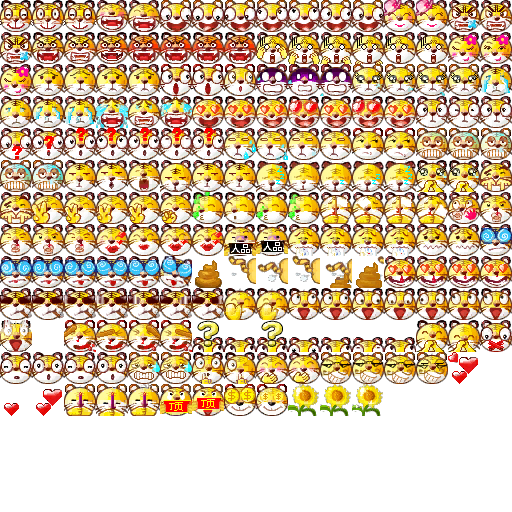
Emotions are the chat smileys used in the in-game chat. Each smiley pack is stored as a DDS spritesheet ( `emotions.dds, emotions0.dds, emotions1.dds, etc` ) paired with a text file ( `emotions.txt, emotions0.txt, emotions1.txt, etc` ) that helps define where each smiley in the sheet starts and ends alongside their name and other necessary data.
Each sprite should be 40x40 pixels.
Example:
[](https://wiki.ethersagadb.com/uploads/images/gallery/2024-01/image-1704515095412.png)
`emotions.txt` is utf-16 encoded.
```
0 3 "01微笑" 15 29 50
3 2 "02大笑" 15 25
5 7 "03调皮" 10 20 30 40 50 60 70
12 2 "04可爱" 20 30
14 3 "05生气" 10 20 30
17 7 "06发怒" 15 25 37 50 60 70 80
24 6 "07抓狂" 10 20 30 40 50 60
30 3 "08害羞" 20 30 40
...
```
|Start Frame|Total Frames|"Name"| Timing for each frame?|
|-|-|-|-|
|0|3|"01微笑"|15 29 50|
|3|2|"02大笑"|15 25|
|5|7|"03调皮"|10 20 30 40 50 60 70|
# Heaven Repository (HR) Icons
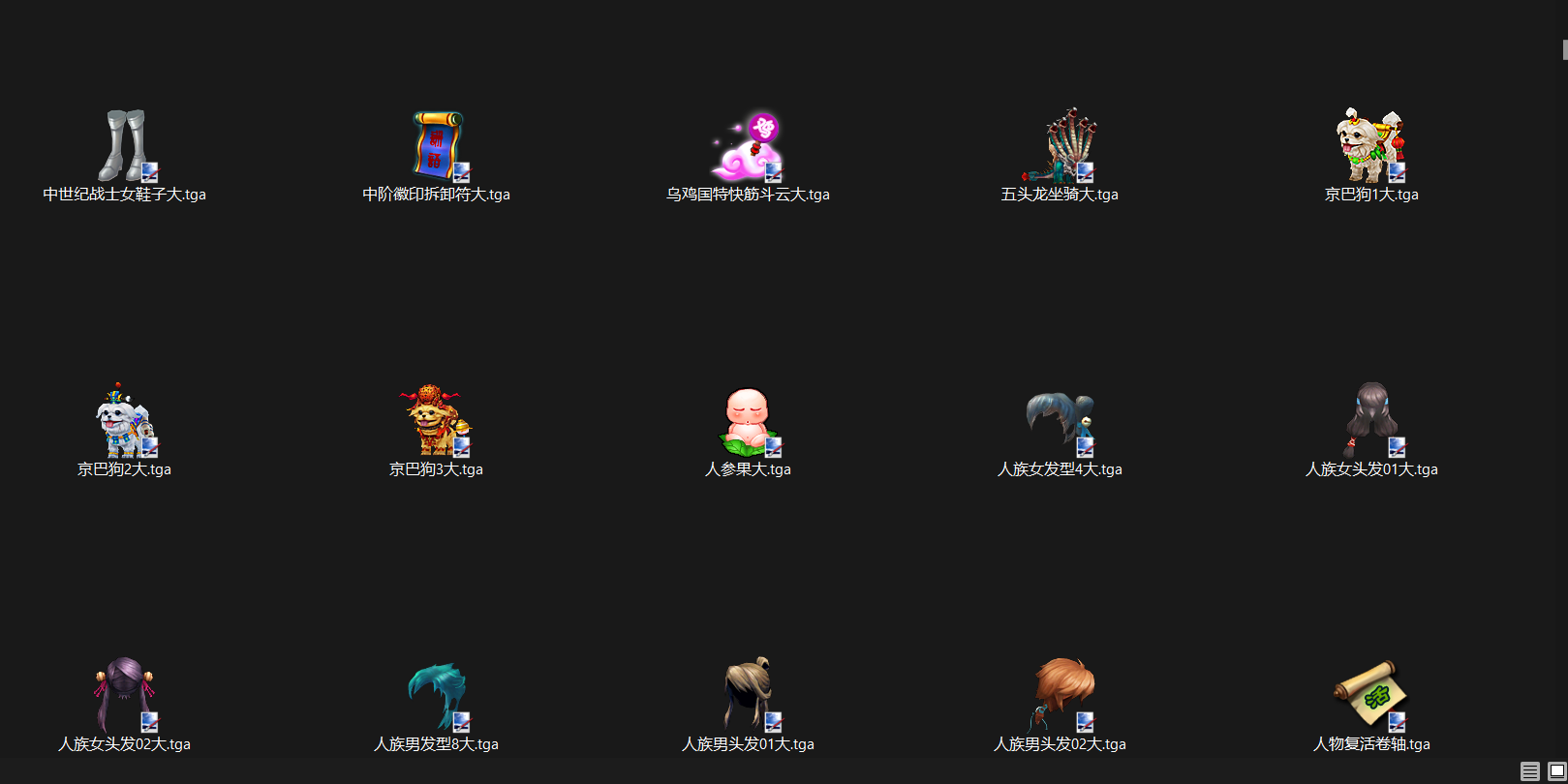
Location: surfaces.pck.files\\surfaces\\qshop\\1
In this location you can find the icons used for gshop files. With a gshop editor this is the file names you want to place with visuals for the items you purchase from HR. (Items will have a copy in this location regardless of if you've added them to item icons in "element\\surfaces.pck.files\\surfaces\\iconset" and set in elements).
[](https://wiki.ethersagadb.com/uploads/images/gallery/2024-03/ff72803c2aba212499f20384df15ff37.png)
# Event Summary
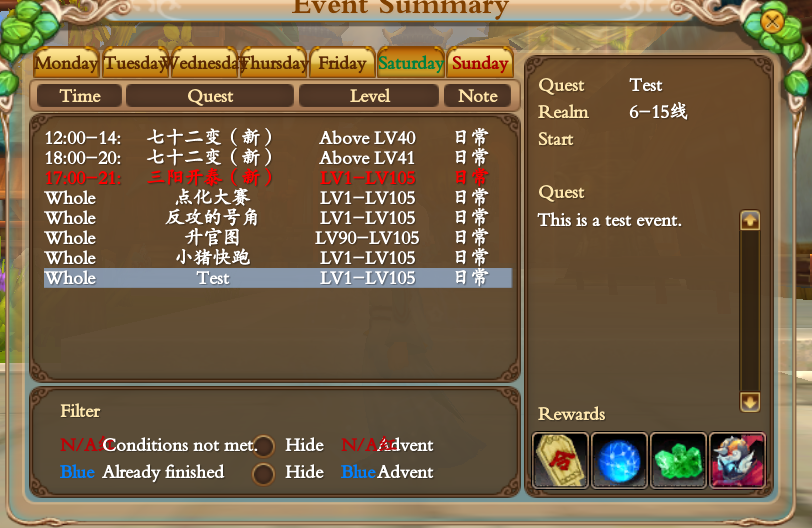
The event summary is a menu that was visible in "old eso" (Pre-Odyssey). At some point they decided to remove this feature from the game but not before updating all the icons and UI.
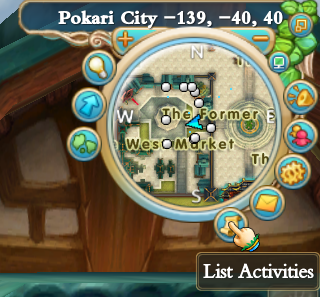
The location of the Event Summary menu button was on the minimap in the upper right corner just below the mail icon.
### Adding The UI Button Back
To add the icon back you should edit `interfaces\minimap.xml` within `interfaces.pck` to include the following button.
You should change the height of the entire minimap node to 185 otherwise the button will only be half clickable.
```xml
```
### Editing The Event Summary
The event summary menu pulls its data from `surfaces\ingame\taskdaily.txt` within `surfaces.pck`.
The file seems to be space delimited (5), each event on a new line and has the following columns in this order.
```
Day of Week | Time | Name | Level | Remarks | Line | Task ID | NPCid | Reward Item ID | Description
```
Example event.
```
"1,2,3,4,5,6,7" "00:00-24:00" "Test" "1-105" "日常" "6-15线" "4035" "0" "24072,24020,14977,7139" "This is a test event."
```
# Decompressing and Extraction of Client Files
Ether Saga game files are compressed into `.pck` archives. To decompress and extract these archives a tool called sPCK is needed.
sPCK usage is quite simple. It takes an argument for the game, whether to extract or compress, and what file to work on.
```
sPCK.exe -eso -x surfaces.pck
```
Arguments for each game are as follows:
- `-pw` - Perfect World
- `-jd` - Jade Dynasty
- `-fw` - Forsaken World
- `-eso` - Ether Saga
You use `-c` for compress or `-x` for extract.
In the above example, we are telling `sPCK.exe` that our `.pck` file is from `-eso` Ether Saga and to `-x` extract the files from `surfaces.pck`
Extracting the files will create a folder called `surfaces.pck.files` that contains all the files extracted from `surfaces.pck`.
For convenience sake you can create a batch script called `unpack.bat` containing the above example and change `surfaces.pck` to whichever `.pck` you wish to extract.
---
### Recompressing
To recompress the files you can simple switch the `-x` to a `-c` and pass `surfaces.pck.files` instead of `surfaces.pck`.
```
sPCK.exe -eso -c surfaces.pck.files
```
For convenience sake you can create a batch script called `recompress.bat` containing the above example and change `surfaces.pck.files` to whichever `.pck.files` you wish to recompress.
# Interfaces
# Adding New Pets
Locations:
Client Side - Found in interfaces.pck, location: element\\interfaces.pck.files\\interfaces\\script
Server Side - Found in /root/kdxy/gamed/config
Pets - Petbedge\_interface.lua - This file needs to be edited both client and server (separately as it has specifics exclusive to both server and client side). Clone a pet in Seledit or Rody's Angelica Editor (much easier in this editor, but it's subscription based).
We'll be using Pandapocalypse (Item ID: 34460) as an example for cloning. Basically we're going to copy everything with the ID 34460 for a new ID.
Pet Speech (continue the sequence):
If the last ending number were 2446, add 2447 and so on.
NOTE: ALL OF THE FOLLOWING IS FOR SERVER-SIDE AS THIS AS MORE SETTINGS TO BE CHANGED.
[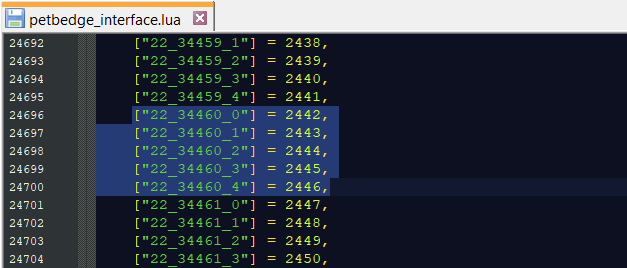](https://wiki.ethersagadb.com/uploads/images/gallery/2024-02/92427bcd38c9671eb6eb221063475f54.png)
Unconfirmed as to what this edits, but we need to make sure to copy the format of #34460.
[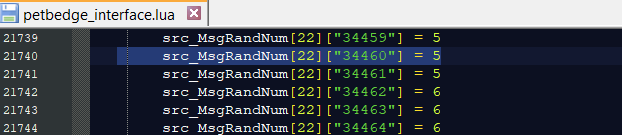](https://wiki.ethersagadb.com/uploads/images/gallery/2024-02/5adedfd43548a891bae370e47affee2e.png)
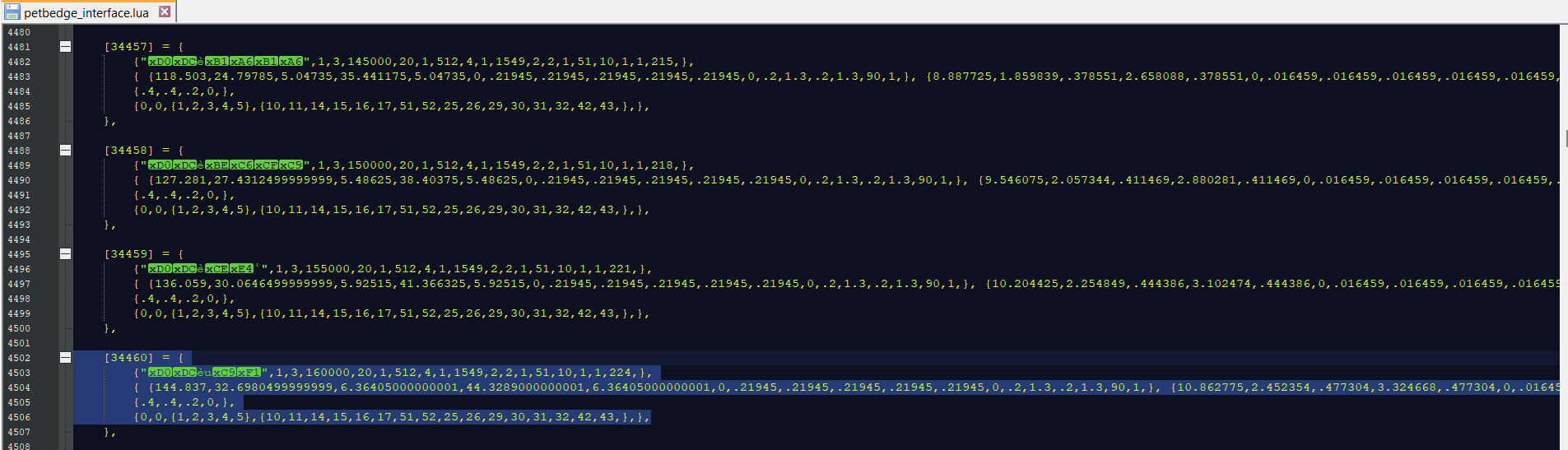
This location is the actual pet stats (this option needs to be different for both server and client side).
Server Side (all you need to do is change the number to another item ID):
[](https://wiki.ethersagadb.com/uploads/images/gallery/2024-02/7652ce861d6d46e9b3eab42a58dcd720.png)
Client Side (change the item ID, but the name must remain Chinese for this section to work or your game will crash):
[](https://wiki.ethersagadb.com/uploads/images/gallery/2024-02/client.png)
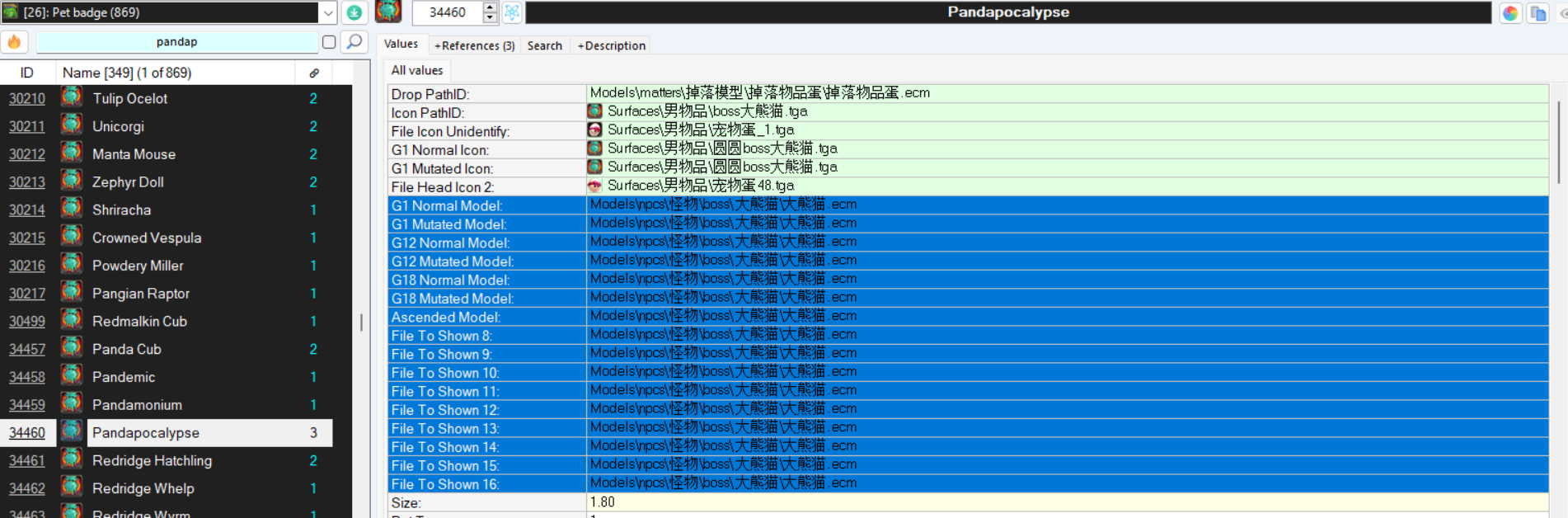
Elements (shown in Rody's Angelica Editor):
-Game model is changed in the highlighted area to whatever you want the pet to look like
-Drop path: What the pet will look like if you drop it (default is an egg)
-Icon path (item appearance in inventory)
-File Icon Unidentify: what the pet looks like in inventory without mirror identification (suggested not to change)
-G1 Normal Icon - Usual icon
-G1 Mutated Icon - Usual icon
-File Head Icon - Uses egg icon (suggested not to change)
Example of values:
\[34460\] = {
{"Мèսɱ",1,3,160000,20,1,512,4,1,1549,2,2,1,51,10,1,1,224,},
{ {144.837,32.6980499999999,6.36405000000001,44.3289000000001,6.36405000000001,0,.21945,.21945,.21945,.21945,.21945,0,.2,1.3,.2,1.3,90,1,}, {10.862775,2.452354,.477304,3.324668,.477304,0,.016459,.016459,.016459,.016459,.016459,0,.015,0,.015,0,6.75,.075,}, {8600,98.09415,19.09215,132.9867,19.09215,0,.72,.72,.693,.693,.756,0,.45,0,.45,0,270,3,}, {39.91064,4.00106666666667,1.00026666666667,4.5012,1.00026666666667,0,.250066666666667,.250066666666667,.250066666666667,.250066666666667,.250066666666667,0,2.27333333333333E-04,0,2.27333333333333E-04,0,0,0,}, {2.993298,.30008,.07502,.33759,.07502,0,.018755,.018755,.018755,.018755,.018755,0,.000017,0,.000017,0,0,0,}, {164,39.2,9.9,44.4,9.9,0,.36179,.36179,.36179,.36179,.396,0,.00066,0,.0006556,0,0,0,},},
{.4,.4,.2,0,},
{0,0,{1,2,3,4,5},{10,11,14,15,16,17,51,52,25,26,29,30,31,32,42,43,},},
},
1549 would be the pet skill it naturally learns
512 would be the pet type (Demonix)
[](https://wiki.ethersagadb.com/uploads/images/gallery/2024-02/cbc569e88fa5a84f1f51e7b8e3402cc9.png)
# Pre-Odyssey Mini-Game
You can find the file for this in "element\\interfaces.pck.files\\interfaces" and would need to look for the file "winmain2.xml"
The mini-game was long since removed with the update for Odyssey but all the components are still in-game.
You just need to add a new button for the mini bar (example on the bottom of it pre-added).
[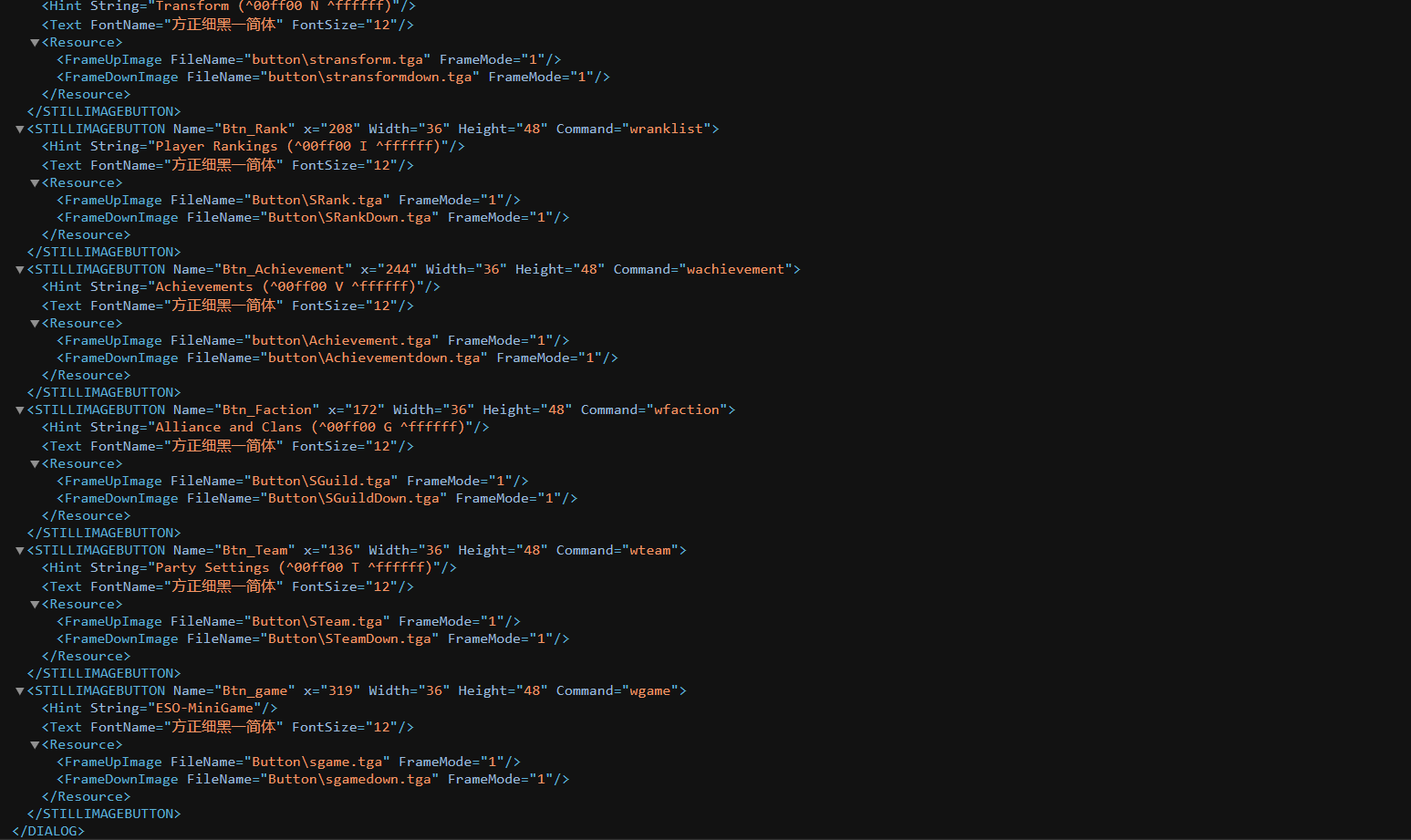](https://wiki.ethersagadb.com/uploads/images/gallery/2024-03/2f9755703fb829b30e93d3fd6d9d25d2.png)
Pre-Edited Mini-Game (Feel Free to Use):
```
```
# Monster Health Bars
Location: element\\interfaces.pck.files\\interfaces
*Warning: Issue still of not showing percentage still remains with the boss "Red-Horn Ape" and anything you may clone using this specific mob. *
Files that need to be edited to add monster percentages:
targetmonster.xml
targetmonster01.xml
targetmonster02.xml
targetmonster03.xml
targetmonster04.xml
Note: Adjust X and Y coordinates as needed to make sure the percentage fits into the bar properly.
Difference (in Example):
<LABEL Name="Txt\_Hp" x="90" y="24">
<Text String="100%" FontName="方正细黑一简体" FontSize="8" Shadow="100" Bold="true" OutlineColor="0,0,0,0" TextUpperColor="0,0,0,0" TextLowerColor="0,0,0,0"/>
</LABEL>
Original:
[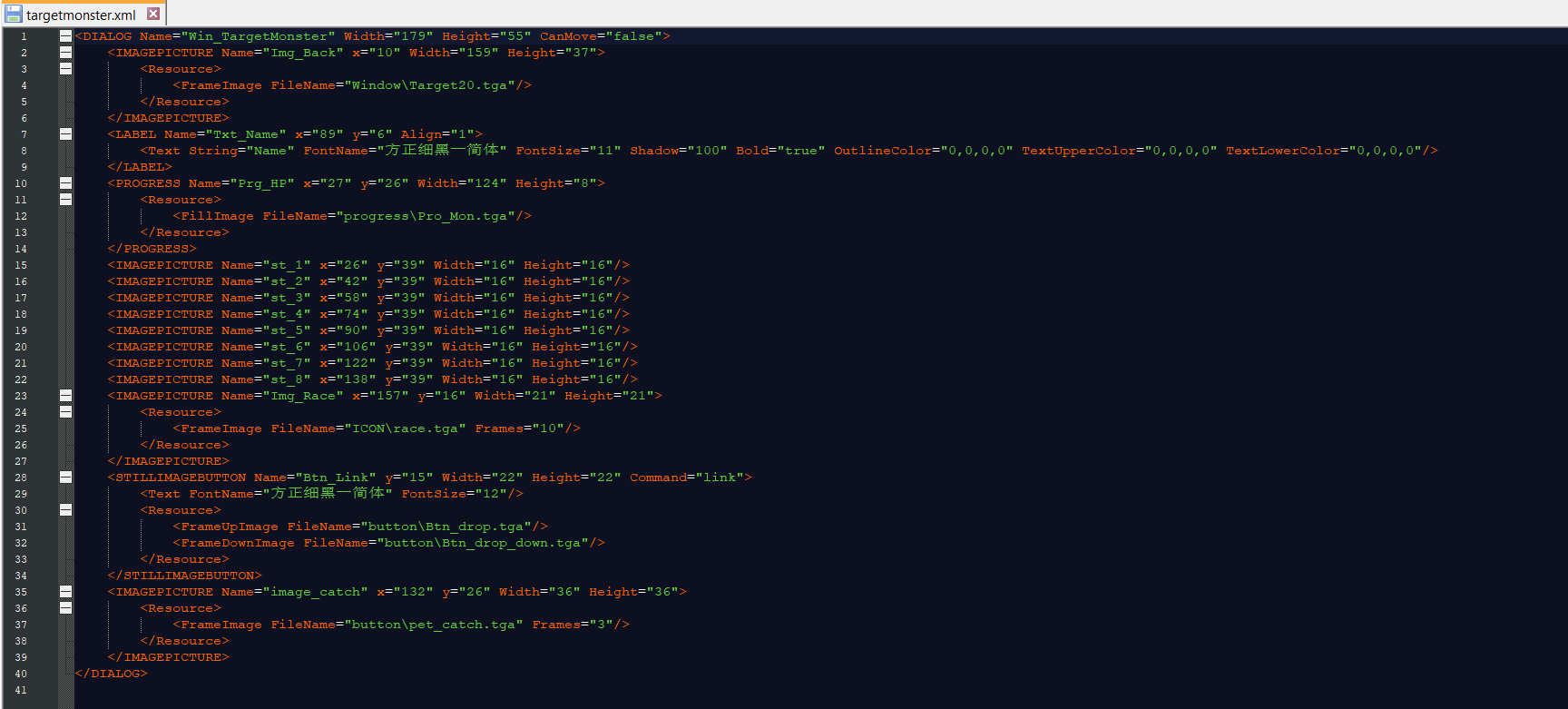](https://wiki.ethersagadb.com/uploads/images/gallery/2024-03/59661f1e4f8bb301a34c8ece06ff619d.png)
Edited:
[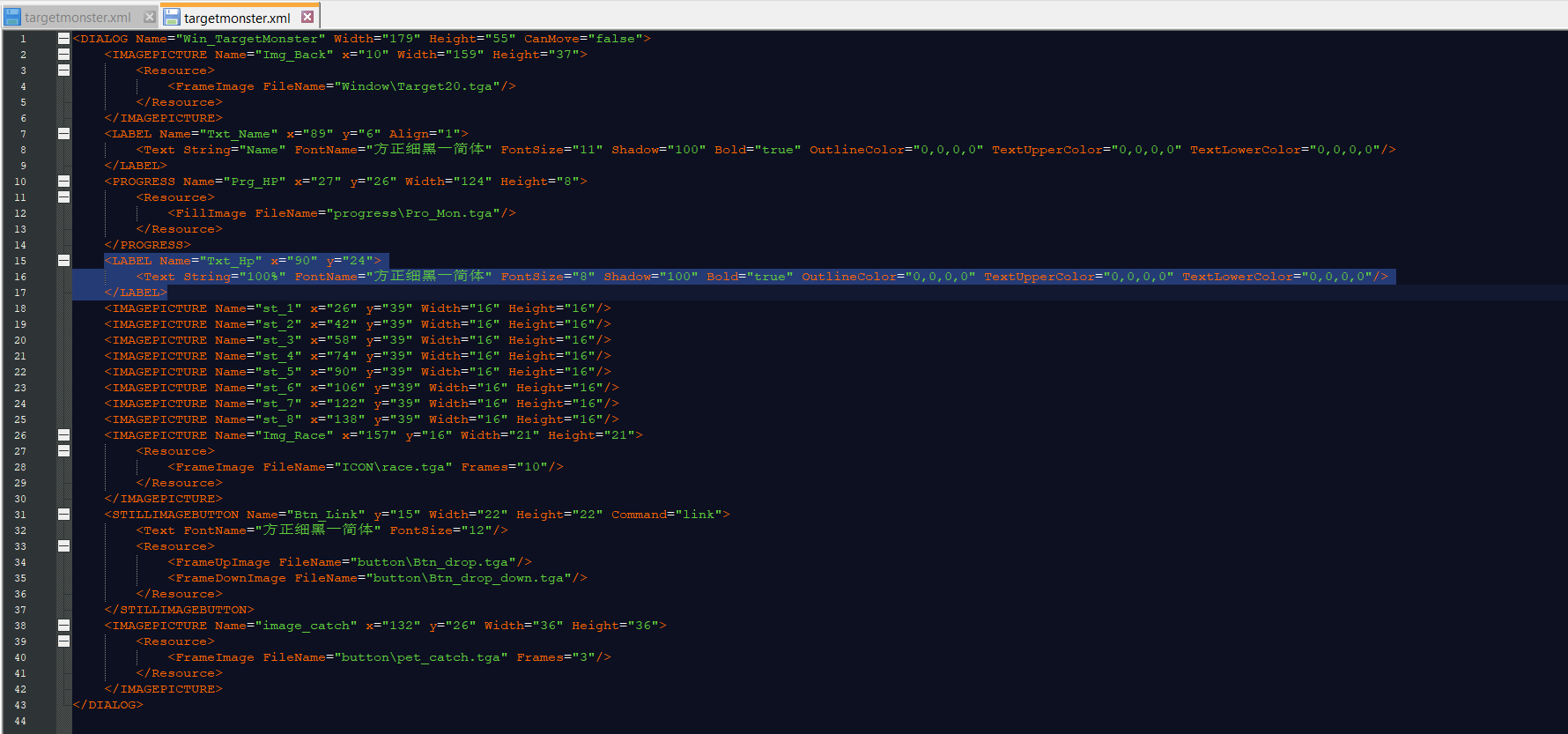](https://wiki.ethersagadb.com/uploads/images/gallery/2024-03/9f6a4653c145515f26217d63cdf3b3b1.png)
Make sure to edit all monster .xml files.
# Equipment Slots
Information stored in `interfaces.pck/character.htf`
```
Equip_10 "Fashion Headwear"
Equip_11 "Fashion Bodywear"
Equip_12 "Fashion Pants"
Equip_13 "Fashion Footwear"
Equip_14 "Fashion Backwear"
Equip_15 "Wings"
Equip_19 "Smiley"
Equip_00 "Weapon"
Equip_01 "Headwear"
Equip_02 "Bodywear"
Equip_03 "Footwear"
Equip_04 "Necklace"
Equip_05 "Ring 1"
Equip_06 "Ring 2"
Equip_07 "Fashion Eyewear"
Equip_08 "Fashion Nosewear"
Equip_09 "Fashion Beard"
Btn_weapon "Use Spirit points to\\rupgrade weapons."
```
# Currency Exchange Interface
This is for currency exchange interfaces. This is for editing the name of currencies in previews such as the below example for Gems.
[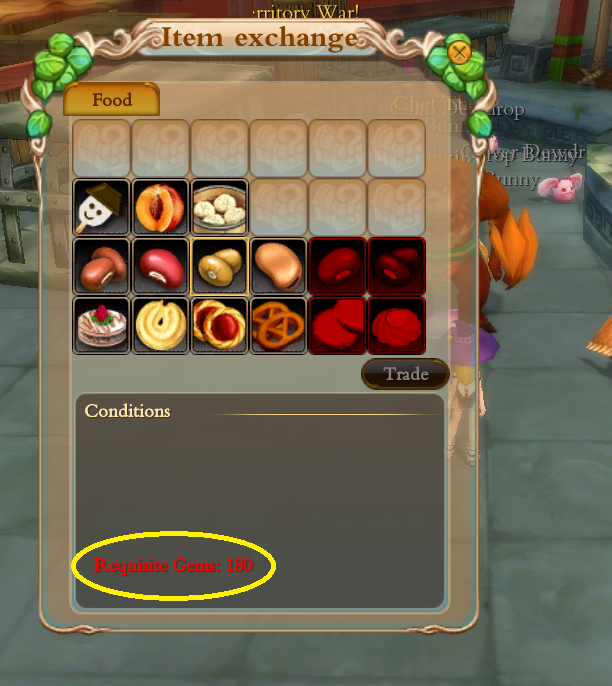](https://wiki.ethersagadb.com/uploads/images/gallery/2024-08/untitled.png)
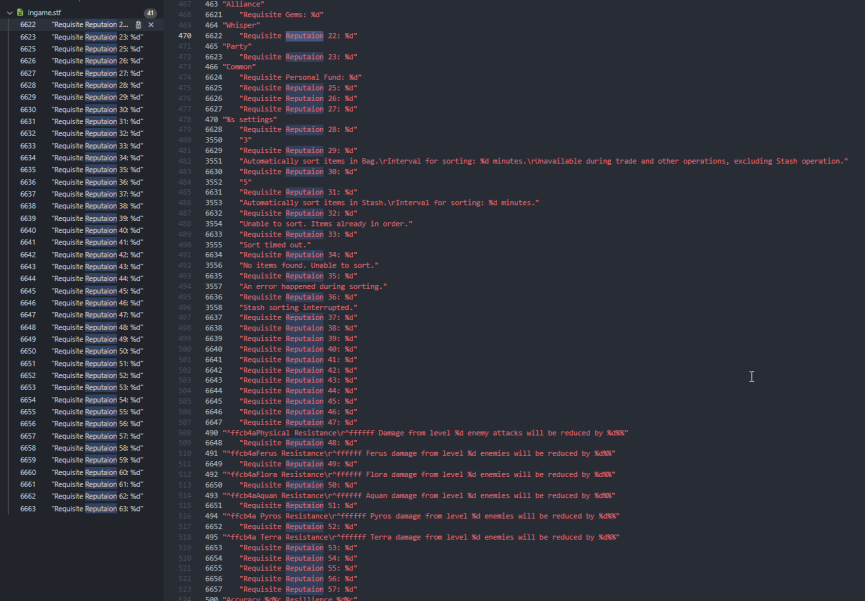
You can find this in Interfaces/ingame.stf
This is what the list of values looks like. Editing the "Reputation #" of any of these can make it appear as whatever you'd like. For example,
"6622 "Requisite Honor: %d"" instead of "Requisite Reputaion 22: %d"
This will now show as requiring the currency "Honor" in-game.
There are plenty unused currencies in-game.
[](https://wiki.ethersagadb.com/uploads/images/gallery/2024-08/image.png)
# Configs
# In-game Database
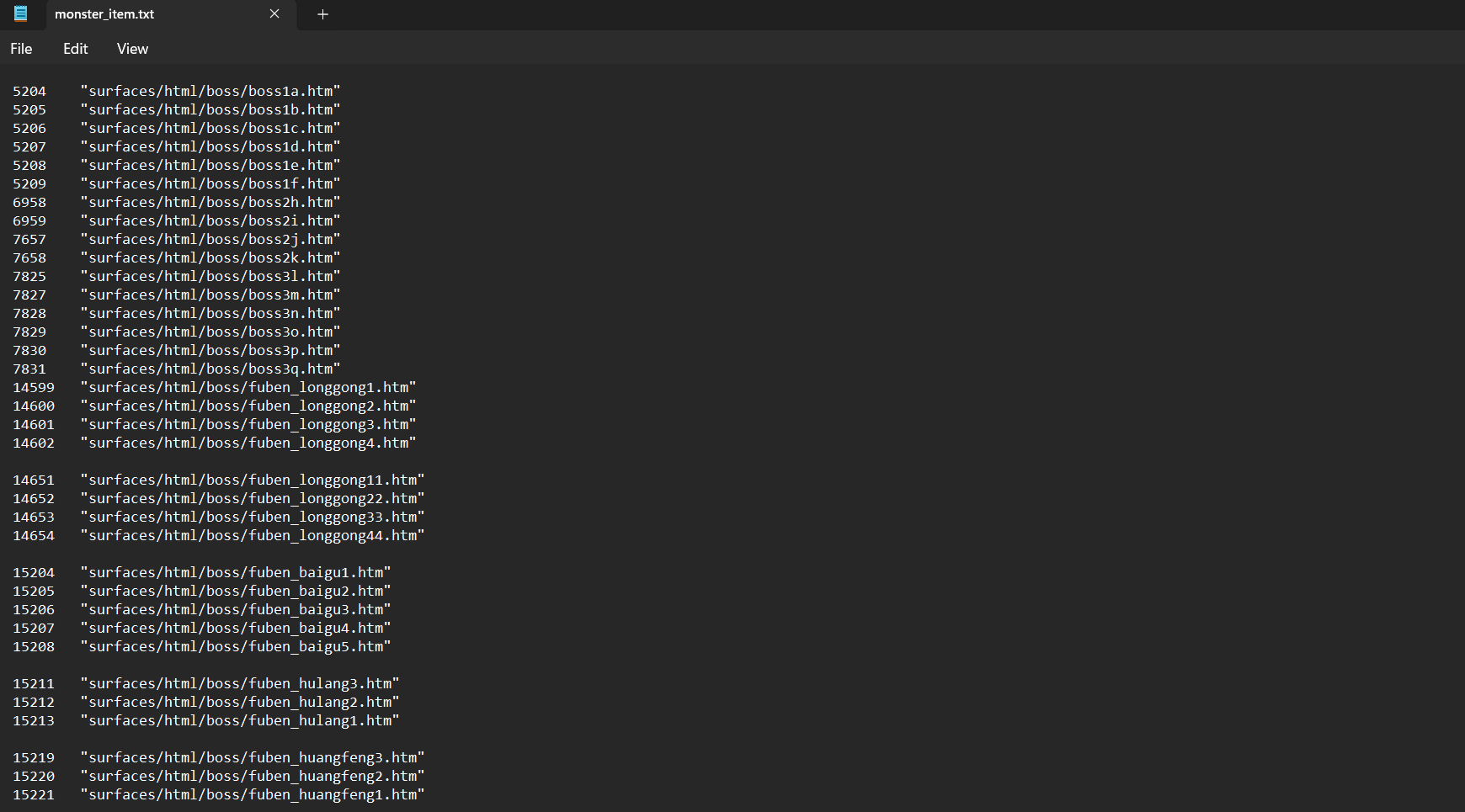
Create and add htm files to a folder of your choosing.
The client originally had pre-made ones for several monsters. You will need to add their locations and monster IDs to the txt file monster\_item.txt in configs.pck
[](https://wiki.ethersagadb.com/uploads/images/gallery/2024-03/database.png)
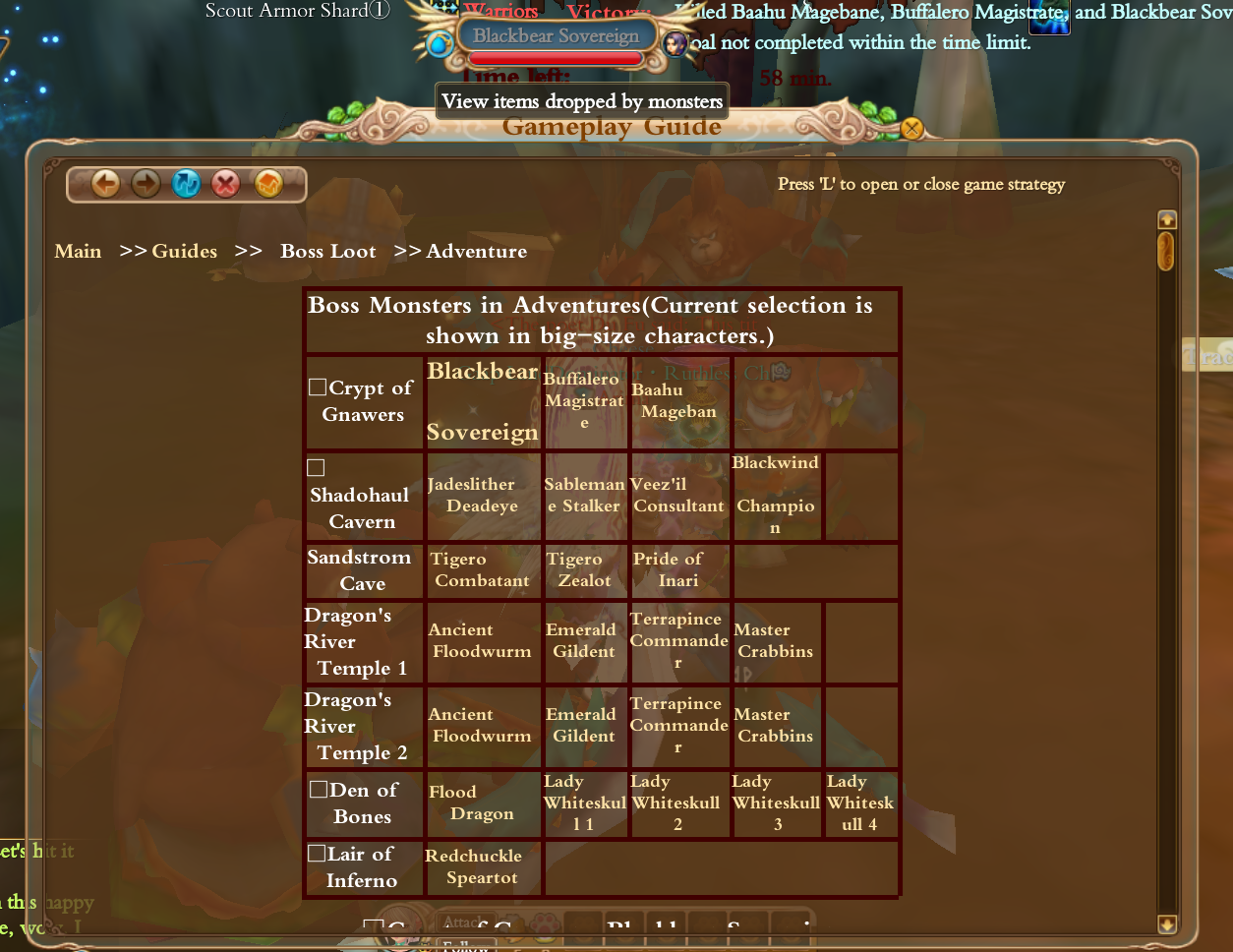
In this case, there needs to be a "surfaces" directory in elements folder. These boss htm still exist in surfaces.pck.
[](https://wiki.ethersagadb.com/uploads/images/gallery/2024-03/7mAdatabase.png)
If the folder "surfaces" (from the surfaces.pck) is moved to the correct location, the button above should appear next to the boss names that have the appropriate corresponding htm pages made. *Above is an example with the dungeon "Crypt of Hunters" and the first boss of that dungeon, "Blackbear Sovereign"*
# Elementclient.exe
# Chat Colors
Chat colors are hardcoded values stored in the game executable as follows:
### Chat Name Color
This is stored at `0x003D745E` in `elementclient.exe`. It is not hardcoded as a string but as the raw ARGB value, `8ADCFFFF` in little endian. `8ADCFFFF` is the default chat name color, `FFFFDC8A`.
### Player Usable Chats
```
int commonChatOffset = 0x0067C4BB; // Common Chat Default Color: ^FFFFFF
int partyChatOffset = 0x0067C4CB; // Party Chat Default Color: ^00FF00
int whisperChatOffset = 0x0067E983; // Whisper Chat Default Color: ^FF7FFF
int allianceChatOffset = 0x0067E993; // Alliance Chat Default Color: ^00FFFF
int clanChatOffset = 0x0067E943; // Clan Chat Default Color: ^14A9FF
int worldChatOffset = 0x0067E9A3; // World Chat Default Color: ^FFFF00
int superChatOffset = 0x0067E933; // Super Chat Default Color: ^A900C7
```
### Non-Player Chats
```
int broadcastChatOffset = 0x0067C4AB; // Broadcast Chat Default Color: ^FF0000
int otherChatOffset = 0x0067E953; // Other Chat Default Color: ^B680FF
int damageChatOffset = 0x0067E973; // Damage Chat Default Color: ^FFAE00
int systemChatOffset = 0x0067E963; // System Chat Default Color: ^FF7F00
```
### Example C# For Programmatic Editing
```c#
using System.Text;
namespace chatColorChanger
{
class Program
{
static void Main(string[] args)
{
using (BinaryWriter writer = new BinaryWriter(File.Open(args[0], FileMode.Open, FileAccess.ReadWrite)))
{
// player usable chats
int commonChatOffset = 0x0067C4BB; // Common Chat Default Color: ^FFFFFF
writer.Seek(commonChatOffset, SeekOrigin.Begin); //move your cursor to the position
writer.Write(Encoding.BigEndianUnicode.GetBytes("^00fcda")); //write new color
}
}
}
}
```
# Launch Arguments
```
rendersize
ip
console
luadebug
lualog
noverchk
forcelogin
token
area
user
pwd
replay
nochangedir
```
Example usage
`elementclient.exe console:1 user:USERNAME pwd:PASSWORD`
### `rendersize`
### `ip`
### `console`
Usage: `console:1`
Values
- `1` - Enables in-game console.
### `luadebug`
### `lualog`
### `noverchk`
### `forcelogin`
### `token`
### `area`
### `user`
Usage: `user:USERNAME`
Replace `USERNAME` with your accounts username.
### `pwd`
Usage: `pwd:PASSWORD`
Replace `PASSWORD` with your accounts password.
### `replay`
### `nochangedir`
# Maps
# Precinct.clt
**Example #1:**
// Element precinct file (client version)
version 7
1330501267
"Pokari City" Area Name
1601 5 75 0 16 1 60 1 16 0 Area ID / # of Co-ords / # of NPCs / # of Other Areas / World ID / # of Music / Leave Timer / Ambient Stereo / World ID / Group ID
15.000000, 16.000000, -56.360001,42.500000, -18.719999 ? / World ID / Portal Co-ords
0,0,0.000000,0.000000,0.000000
0,0,0.000000,0.000000,0.000000
0,0,0.000000,0.000000,0.000000
-377.255249 138.131409 457.909088 Area Boarder Co-ords (xyz)
-362.873779 78.828430 -221.574158
207.600723 58.555016 -202.462250
270.362122 174.479614 475.261200
-377.240601 138.131958 457.901886
"Stash Keeper Pital" -239.110001 43.840000 0.690000 "NPC" Co-ords (xyz)
"Transporter Marcy" -71.570000 38.049999 -143.500000
"Roor the Hunter" 120.980003 41.189999 6.540000
"Apothecary Yoon" -155.199997 40.650002 14.990000
"Blacksmith Qioz" -138.229996 41.139999 6.990000
"Ancestral Forge" -131.820007 40.340000 -10.150000
"Wehn" -52.130001 50.680000 174.899994
"Pokari Bulletin Board" -36.450001 38.049999 -143.589996
"Dispatcher Chun" -76.000000 38.000000 -144.000000
"Award Agent" 114.000000 44.000000 -110.000000
"Cloud Creek" -56.000000 42.000000 -28.000000
"Pokari Deputy" -34.720001 38.049999 -143.550003
"Pokari Agent" -38.330002 38.049999 -143.589996
"Pokari Sheriff" -41.459999 38.049999 -143.669998
"Miss Grace" 105.949997 44.320000 -90.430000
"Wu Cheng'en" 18.530001 45.740002 328.910004
"Glide Gear Dealer" -141.169998 41.290001 -98.300003
"Nimbus Rider" -227.899994 41.189999 8.420000
"Book Merchant Wath" -181.039993 42.520000 -74.120003
"Clan Director" -34.900002 47.759998 120.309998
"Woodsman Roki" -221.580002 44.290001 -88.620003
"Mount Merchant" 120.320000 41.189999 -4.070000
"Mapkeeper Ming" -47.540001 38.049999 1.920000
"General Scruffins" 39.220001 40.650002 15.370000
"Foreign Monk" 66.349998 40.650002 15.340000
"Swordkeeper Kash" 84.330002 40.360001 -55.029999
"Elsa" 67.669998 41.320000 -73.459999
"Scholar Loskit" 32.750000 40.279999 -16.040001
"General Zurin" -62.230000 50.689999 175.009995
"General Uree" -62.259998 50.500000 172.889999
"Ziola" 26.629999 41.290001 -64.269997
"Traveling Monk" 25.570000 41.290001 -97.989998
"Veteran" 61.500000 41.560001 -36.910000
"Hydraulic Engineer" 66.449997 41.340000 -74.699997
"Engineer's Wife" 68.800003 41.310001 -72.400002
"Pumpkin Farmer" 19.990000 43.450001 -132.460007
"Craftsman Bolo" -231.919998 44.860001 -108.629997
"Tool Merchant Gin" -223.000000 43.290001 -111.000000
"Gear Guide Fren" -224.130005 43.290001 -103.290001
"Guard Mino" -61.900002 38.529999 87.660004
"Guard Su" -50.740002 38.529999 87.739998
"Guard Inko" -50.919998 49.040001 156.449997
"Guard Deen" -63.290001 49.040001 156.460007
"Guard Leon" -67.910004 38.049999 58.830002
"Guard Lon" -44.389999 38.049999 58.849998
"Pokari Broker" -183.199997 43.950001 -36.180000
"Matchmaker" -251.350006 41.360001 303.880005
"Destroyer Kong" 19.750000 40.650002 -22.490000
"Trader Larz" -140.229996 41.290001 -63.740002
"Mogui Outfitter Mali" -140.020004 41.330002 -65.029999
"The Sweeper" 98.669998 40.009998 243.199997
"Dusk Dragonkin" -109.000000 38.000000 79.000000
"Dawn Dragonkin" -119.000000 38.000000 79.000000
"Pokari Virtue Agent" -83.000000 48.000000 127.000000
"Ether Castle Agent" -32.000000 48.000000 124.000000
"Achievement Shrine" 129.000000 40.000000 -26.000000
"Dragon Slayer Forger" -142.570007 41.139999 15.010000
"General Moyon" -51.770000 50.349998 171.050003
"Warrior Mofan" -51.919998 50.500000 172.899994
"Master of Arms" -183.610001 40.689999 15.350000
"Wath's Assistant" -28.670000 47.759998 126.680000
"Cloud Boy" -25.570000 47.759998 129.850006
"Ingot Exchanger Tee" -92.300003 47.759998 135.940002
"Ingot Exchanger Doo" -89.260002 47.759998 132.970001
"Ingot Exchanger Qien" -86.230003 47.759998 129.759995
"Ingot Exchanger Dollar" -95.000000 48.000000 139.000000
"Mail Box" -2.380000 38.029999 -48.590000
"East Market Teleporter" 57.000000 42.000000 -38.000000
"West Market Teleporter" -189.000000 42.000000 -42.000000
"Temple Teleporter" -52.000000 48.000000 120.000000
"Trainer Gruffin" 123.419998 41.189999 3.010000
"Chef Theo" 117.519997 41.189999 8.900000
"Trapper Verni" 113.559998 41.189999 9.540000
"Collector Val" 123.796997 41.194000 -0.228000
"Transformation Card Trade" 107.327003 40.849998 248.007004
Other Areas
"huanjingyinxiao\chengzhenbaitian.wav" Ambient Stereo
"Music\changan.ogg" Music
"huanjingyinxiao\chengzhenbaitian.wav" Ambient Stereo
Credit: Rouge Alma
**Example #2:**
PRECINCT.CLT/SEV Go To Town Configuration (example):
// Element precinct file (client version)
version 6
1136977321
"Den of Rabid Wolves"
10601 5 0 4 1 3 30 1 106 0 = WID-AID / # of co-ord lines / # of other area lines / ambiencestereo / WID TO "RELEASE" or "Town Portal" TO / BGM(music) / LEAVE TIMER / enable disable (0-1) / WID OF CURRENT MAP / Group ID
-1496.193970, 254.130005, 889.504028 = COORDINATES TO "RELEASE" or "Town Portal" TO
-512.000000 332.649017 512.000000 \\
512.000000 332.649017 512.000000
512.000000 332.649017 -512.000000 co-ord lines (town limits)
-512.000000 332.649017 -512.000000
-512.000000 332.649017 512.000000 /
"Avalanche Village" -710.494019 231.817001 4244.563965 \\
"Snowy Village" -2520.416016 216.925003 4100.319824
"The Forgotten Frostland" -2820.738037 241.505005 4180.767090 Other area lines (added for example only-not part of a06)\[if it were it would change the very first line to this: 10601 5 (4) 4 1 3 30 1 106 0 \]
"Harshlands Officer" -2517.510010 216.667999 4109.569824 /
"ambiencestereo\\dungeon4.wav"
"Music\\common\_e1.mp3" \\
"Music\\dungeon\_b1.mp3" BGM(music)\[3\]
"Music\\dungeon\_c1.mp3" /
"ambiencestereo\\dungeon4.wav"
\--===further precinct notes===--
ambiencestereo = 0-none 1,2,3,4
BGM(music) 0-none or the number of lines of music played in sequence
Group ID for world\_targets?
enable disable 0=off/disable 1=on/enable
WID = World ID
Credit: Steve Langley
# Region.clt
// Element region file (client version)
version 6
1330501267
\[region\] Area
"长安城安全区" Area Name
1 895 0 5 PK-Zone / Area ID / ? / Number of Points
-377.255249 138.131409 457.909088
-362.873779 78.828430 -221.574158
207.600723 58.555016 -202.462250
270.362122 174.479614 475.261200
-377.240601 138.131958 457.901886
\[trans\] Portal
1 16 1 World ID To (e.g. Gaap) / World ID From (e.g. Pokari) / Minimum Level
-56.187237, 37.604233, -133.804794 Portal Co-ords From (e.g. Pokari)
2.500000, 25.000000, 2.500000 Portal Range Allowance
463.795013, 245.500000, 439.851013 Portal Co-ords To (e.g Gaap)
Credit: RougeAlma
\[region\]
"安全区"
1 10
-2530.360596 212.984573 4179.893066
-2479.267334 220.548294 4190.765625
-2437.542236 220.995117 4137.787109
-2469.698486 218.411942 4087.776855
-2505.385742 221.888626 4047.897217
-2520.250244 217.868668 4051.548096
-2579.227051 217.949570 4079.913330
-2578.665527 216.452377 4123.163086
-2546.649414 218.257568 4170.906250
-2530.360596 212.984573 4179.893066
is the safezone section
the:
\[trans\]
116 1 0
-2392.144043, 260.299011, 4428.956055
10.000000, 5.000000, 5.000000
-175.348999, 256.104004, -437.670990
is the region transport
\[trans\] = tells it the following is transport info
131 1 60 = WORLD ID TAG TO / WORLD ID TAG FROM / LV REQ (IDK why HH/TT is 1 60; when every other \[trans\] is 1 0)
-2708.798096, 404.276001, 1185.218994 = this line tells it the cords to teleport from the map (in which this region file is for)
5.000000, 5.000000, 5.000000 = this I am guessing is the range for which the transport area works (how far outside of the above number)
-477.000000, 131.000000, 475.000000 = this line tells it where to take you inside the new location
Credit: 343
# Data
# path.data
`path.data` is fairly simple. It contains a mapping of ID's to asset paths.
The file starts with 4 bytes representing a `timestamp` in unix epoch and 4 bytes representing the total number of paths in the file.
Each path consists of a varying number of bytes. The first 4 bytes of a path are the ID, the next 4 bytes are the length of the path in bytes. Reading bytes equivalent to the length will give you a `GB2312` encoded string representing the path.
Example snippet of a `path.data` export.
```
1,Models\npcs\怪物\植物系\木怪\木怪.ecm
2,Models\npcs\怪物\飞行系\通用蝙蝠怪\通用蝙蝠怪.ecm
3,Models\npcs\怪物\飞行系\大怪鸟\大怪鸟.ecm
4,Models\npcs\怪物\飞行系\吸血蝙蝠怪\吸血蝙蝠怪.ecm
5,Models\npcs\怪物\飞行系\吸血蝙蝠\吸血蝙蝠.ecm
6,Models\npcs\怪物\金属系\铜钱妖\铜钱妖.ecm
7,Models\npcs\怪物\金属系\怪箱子\怪箱子.ecm
```
An example C# class representing the data.
```csharp
public class PathData
{
public Int32 Timestamp { get; set; }
public Int32 TotalPaths { get; set; }
public ESOPath[] ESOPaths { get; set; }
}
public class ESOPath : PathData
{
public Int32 ID { get; set; }
public Int32 PathLength {get; set;}
public String? FilePath { get; set; }
}
```
# aipolicy.data
# domain.data
# dyn_tasks.data
# dynamicobjects.data
# elements.data
# gshop.data
# screentasks.data
# task_npc.data
# tasks.data
# Models
# Ski Files
This information is taken from resources for Perfect World. While Perfect World and other Angelica engine games are very similar there may be some differences. This information needs to be confirmed for Ether Saga.
## General File Structure
|Offset|Name|Data Size|Typ. Values|Meaning|Comments|
|-|-|-|-|-|-|
|0x0000|moxbiksa[8]|CHAR|"MOXBIKSA"|file type identifier|Ski BMOX|
|0x0008|ski_type|DWORD|8 or 9||Type 9 has bone names listed, type 8 doesn't|
|0x000C|mesh_count[4]|DWORD|1,0,0,0 or 2,0,0,0|number of meshes|Defines a `vertex_type` as well. (index to mesh_count[]); so `vertex_type` goes (0,1,?,?)|
|0x001C|tex_count|DWORD|1 or 2|number of textures||
|0x0020|mat_count|DWORD|1 or 2|number of materials||
|0x0024|num_bips|DWORD|4 or more|number of “bones”|if ski_type=8, always no bips (but num_bips=4)|
|0x0028|(unknown_2)|DWORD|0||only value 0 spotted currently|
|0x002C|(type_mask)|DWORD|41 or 43 or ...|num.Bones in *.bon|Seems to identify the type of Avatar; Human_Female=41, Demon_Female = 43, Human_Male = 35, ...|
|0x0030|zero_60|DWORD|0,0,0,...||just 15 zero DWORDs (or 60 zero BYTEs)|
```
IF ski_type == 9: {{{
Bone Names
0x006C Repeat [num_bips]: {{{
bone_len DWORD e.g. 12 string len (bone name)
bone_name[len] CHAR “Bip01 L Foot” the bone name string no trailing /0
}}} }}}
Textures
0x006C + (bones) Repeat [tex_count]: {{{
tex_len DWORD e.g. 16 number of bytes, not chinese letters
tex_name[len] CHAR "中式婚礼女鞋.dds” Texture file name (maybe unicode)
}}}
Materials
Repeat [mat_count]: {{{
MatHeader String-z “MATERIAL: “/0 Header for Mat.Block 10 bytes + trail-/0
mat_values[16] FLOAT 1, 1, 1, 1, 1, 1, 1, 1, (unknown) could be a matrix ...
0, 0, 0, 1, 0, 0, 0, 1 (unknown) ... or other float parameters
scale_param FLOAT 9.999 or 19,999 or 10.0 a scaling factor? (a “0” was spotted too)
is_clothing BYTE 0x00 or 0x01 if fashion or not? could be boolean
}}}
Meshes
Repeat [mesh_count]: <<<
obj_len DWORD e.g. 8 string len (mesh_obj)
mesh_obj[len] CHAR "萤火虫_0” name of the model no trailing /0
tex_index LONG_32 0 or 1 or ...? index to texture none if -1
mat_index LONG_32 0 index to materials
IF vertex_type == 1: {{{ vertex_type: (see “mesh_count[]” above)
extra_data[4] BYTE (unknown)
}}}
vertex_count DWORD 1235 number of vertices
faceverts_count DWORD 6084 number of faceverts faceverts_count = 3*face_count, because always triangles
Vertices
Repeat [vertex_count]: {{{
vertex_position[3] FLOAT (0.05, 1.0, -0.234) vertex coordinate -X, -Z, Y
IF vertex_type == 0: {{{
vertex_weight[3] FLOAT (0.7, 0.3, 0.0) bone influence ? seem 2nd value is always between 1st and 3rd
bone_index[4] BYTE (3, 12, 0, 27) list of 4 “bones” the order must be kept; don't sort!
}}}
vertex_normal[3] FLOAT vertex normal vector
vertex_UV_coord[2] FLOAT u/v-coordinate of vertex U, 1-V
}}}
Faces
Repeat [face_count]: {{{ face_count = faceverts_count / 3
vertex_index[3] USHORT_16 (123, 122, 144) 3 indices to vertices
}}}
(End Meshes) >>>
[EOF]
```
# Console Commands
# Debug Commands
Disclaimer: Most of these have been proven to work, some have yet to be tested.
### System Commands
-------------------
#### Changer render of mipmap/pixel. 0-10 high-low quality
``d_mipmapbias``
#### Sight of your camera.
``d_viewradius``
#### Seems to be useless or not working.
``d_playerradius``
#### Change the render of the trees. 0-4
``d_treelod``
#### Show/Hide Water 0-2
``d_render_water``
#### Show/Hide Grasses
``d_render_grass``
#### Show/Hide Trees
``d_render_forest``
#### Show/Hide Shadow
``d_render_shadow``
#### Show/Hide Outline
``d_render_outline``
#### Do not prevent the window from updating when it loses focus.
``d_rendernofocus``
#### Changes UI theme 0=old 1=new
``d_theme``
#### Change ingame time (client side only). Format: 10,00 (mean 10AM).
``d_settimeofday``
#### Same thing as (F9) but without the Screenshot window.
``d_cameramode``
#### Move to X, Y cords. Use ``d_showpos`` to help you.
``d_goto x, y``
#### Move to the specified game coordinates
``d_go x, y``
#### Display all purchased EB?
``d_money``
#### Open a url in the browser
``d_ie ``
#### Changes window title?
``d_title``
#### Fly but only works when you have a high movement speed. For flying without speed adjustments use [d_c2scmd fly](#Fly-but-not-broken)
``d_fly``
#### Changes player runspeed values exceeding 5 cause rubberbanding due to server anti-cheat
``d_runspeed``
#### Seems to be useless or not working. Perhaps to use a skill?
``d_skill``
#### Seems to be useless or not working. Quests are known as Tasks may be related to completing a quest
``d_task``
#### Return to character selection screen.
``d_relogin``
### Information
---------------
#### Some wire boxes on in-game objects.
``d_boundbox``
#### Show Dynamic NPC's ID in the order they were spawned.
``d_npcid``
#### Show/Hide the cords for every NPC, MOB, PLAYER (and you).
``d_showpos``
#### Show the distance between your character and the cursor.
``d_testdist``
#### Show/Hide item/npc/character's ID instead of their name. You can also get a character's ID by ``CTRL + Right Click`` their name in chat.
``d_showid``
#### Show the server date and time.
``d_getservertime``
#### Show last login time
``d_lastlogintime``
#### Show character creation time
``d_createtime``
### Show Debug info
-------------------
#### Shows debug info
``d_rtdebug``
#### Show/Hide 3D game information.
``d_a3dstat``
#### Show/Hide computer and game resources.
``d_gamestat``
#### Display information related to debugging UI
``d_uidebug``
#### Show/Hide FPS in the right upper corner of the screen.
``d_fps``
#### Shows a gfc from gfc.pck (requires dir location)
``d_gfx``
#### Seems to be useless or not working.
``d_skipframe``
#### Seems to be useless or not working.
``d_modelupdate``
#### Write dump, close the game and show the Report Bug window.
``d_minidump``
### ID Search
-------------
#### Search for a partial name of an item / mob / npc and get its ID in return
``d_query``
#### Type an npc id and get back its coordinates (if its already in the autopath database)
``d_querynpc``
#### Search for a partial name of an NPC Service and get its ID in return
``d_queryservice``
#### Type in a partial model path and it spits out the items that use it
``d_querymodel``
### ???
-------
#### Seems to be useless or not working.
``d_turnaround``
#### Seems to be useless or not working.
``d_trnlayer``
#### Seems to be useless or not working.
``d_trncull``
#### Maybe for make some changes on GS(gamed)? GS controls the servers rates(exp/drop/gold/spirit/etc) and who knows what else.
``d_gscmd``
#### Delete command?
``d_delcmd``
#### Seems to be useless or not working.
``d_namepos``
# Client to Server Commands
#### Drop gold on ground
``d_c2scmd 20 ``
#### Invite player to party
``d_c2scmd 27 ``
#### Meditate
``d_c2scmd 46``
#### Open Self Shop
``d_c2scmd 84``
#### Initiate duel with a player
``d_c2scmd 92 ``
#### Take your hands? (Embrace)
``d_c2scmd 95 ``
#### View characters information
``d_c2scmd 99 ``
#### Change class
``d_c2scmd 1102 0 ``
#### Gain gold relevant to the equation (level*100)
``d_c2scmd 1988``
#### Change pet mood maybe?
``d_c2scmd 1989 ``
#### Gives exp + spirit(note this is affected by the servers exp rate and can result in receiving negative experience)
``d_c2scmd 1999``
#### Add level 1 character
``d_c2scmd 2000``
#### Create item with 1 minute timer(no idea how to change timer amount needs to be looked into)
``d_c2scmd 2001 ``
#### Grants double experience for target player for a duration range of 0 to 14400 seconds.
``d_c2scmd 2009 ``
#### Gain 100 EB
``d_c2scmd 2014``
#### Expand inventory slots by amount
``d_c2scmd 2016 ``
#### Makes target player spouse
``d_c2scmd 2020 ``
#### Clears inventory
``d_c2scmd 4444``
#### Spawns item by quantity on the ground
``d_c2scmd 10800 ``
#### Gain experience by amount(note this is affected by the servers exp rate and can result in receiving negative experience)
``d_c2scmd 10889 ``
#### Spawns a mob/npc for the specified duration (NPCs that are spawned are not interactable)
``d_c2scmd 10802 0``
#### Fly but not broken
``d_c2scmd 10803 66``
# GM Commands
- ``gm_kickout_role``
- ``gm_kickout_user``
- ``gm_list_user``
- ``gm_online_num``
- ``gm_restart_sev``
- ``gm_shutup_role``
- ``gm_shutup_user``
- ``gm_moveto_player``
- ``gm_callin_player``
- ``gm_broadcast``
- ``gm_showid``
- ``gm_forbid_role``
- ``gm_trigger_chat``
- ``gm_generate``