Guides
Pet Melding
Maxing Pet Stats
Pet Melding
REQUIRED:
- Clever Dewdrop Bunny or Bright Dewdrop Bunny
- Caught near Roor the Hunter or purchased from Collector Val's shop.
- Bumbaboar
- Purchased from Collector Val's shop.
- The pet you want to max.
- Gold
- Spirit
-
Level all the pets to at least level 120: By means of Wisdom, tales, miniboss in Future Finale or others.
-
Put the Dewdrop Bunny as Host, Bumbaboar as support.
-
Meld. This should max the bunny.
*Note, you should level the pet back to 120 before reading any further.
-
Put the MAIN PET YOU WANT TO MAX into the forge as main, and that bunny as support. AGAIN, ALL LV120+ (higher is better and always preview before melding.
-
SUCCESS!
How to Read Preview:
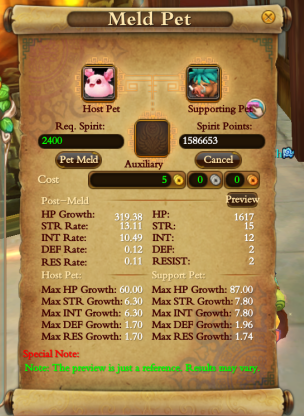
The bottom section under "Host Pet" shows the maximum potential of the Clever DewDrop Bunny. So example: 60.00 is the maximum HP this specific pet can reach.
The "Post-Meld" preview shows 319.38 as maximum HP transfer. What does this mean? That this would be beyond successful to max it to 60.00.
Note: Maximum potential stats can not be raised for pets. Each pet has a different maximum potential (the best pets being Evolution pets due to higher stats).
Pet's Elemental Affinity
Elemental Affinities affect your Pet's basic attributes
Oora: Adds 0.9 STR to your pet every Level-Up
Widu: Adds 0.3 RESIST and 0.3 INT to your pet every Level-Up
Unda: Adds 7.5 HP to your pet every Level-Up
Pyra: Adds 0.9 INT to your pet every Level-Up
Erda: Adds 0.3 STR and 0.3 DEF to your pet every Level-Up
Beastkin = Unda
Humanoind = Random
Mechen = Oora
Elementa = Pyra
Scalen = Random
Maxing Defense and Resistance (old)
Note for New Version: For the new version replace AR with Evolution Pets (example: Panda Cub). They can not mutate.
REQUIRED:
- 11 Calm* Auto-repair Androids(from traps found when killing them) or Evolution Pet. Ex: Panda Cub. Note: Evolution pets do not mutate.
- 10 Charm of Memory
- Your pet
- Lots of Gold
- Lots of Spirit
- Collect traps and catch 11 androids (ONE OF WHICH, must be same element as your main pet)
*Calm has highest boost in stats when melding. 2. Level them all to Lv120+. 3. Meld the highest def/resis growth AR into the AR with same element as your main pet.(Explain why later) 4. Level the 1 meld AR to Lv120. 5. Repeat 3-4 but with Charm this time. 6. Stop when you have a 10 melded AR. The def/resis stats should be all red/orange. 6.5 Remember always to level your pet to 120+ for best melding stats. 7. Meld this into your pet Voila.
Expensive Alternative:
-
Level Panda Cubs or an evolution pet to 120 with same method. But get DEF/RES to around 1.90.
-
Evolve the Evolution Pet once.
-
Buy a Charm of Addition from HR.
-
Level both pets 120+
-
Put your evolved pet as host. And the pet you want DEF/RES maxed as Support. (Charm of Addition takes support pet appearance). And meld!
-
Pet should be maxed!
Alright. The facts behind all this.
The reason why we meld HIGHEST growth into Lowest growth is because the pet system works on the "difference" of support to main. If the Support has a higher difference of stats to main, the new pet will have a more dramatic change. Always remember. Similar things will meld better than different ones.
What if my pet mutates during my AR melds?
ITS OKAY! Perfectly fine! It will do that
What if my pet did not max?
You must've missed something from the guide. ITS OKAY!!Follow the guide and repeat!
Custom Fashion
Requirements
- sPCK.exe
- ModelViewer.exe
- Paint.NET
Warnings
Ether Saga should be closed while editing files to avoid corrupting and crashing the game. Please create a copy of your game to work from if you wish to play while working and make sure to take regular back ups.
Avoid changing filenames if making modifications for a server you do not run. You will not be able to add fashion, only change fashion.
Getting Started
To start create a working directory, in this example we will be referring to it as work-dir. Inside of work-dir you will want to have the following tools:
-
sPCK.exe -
ModelViewer.exe -
models.pck
models.pck should copied from the game folder. Obtaining the rest of the tools is an exercise left for the user.
Next you will want to open a terminal or cmd and navigate to your work-dir. We will unpack the model files by running sPCK.exe -x models.pck inside of our work-dir.
Locating Fashion Models
This was really hard at first, but I made it easier for you. Just doubleclick Unpack.bat and the unpacking will start! There will be a black screen with some letters and numbers on it, but just let it do its job. When you see no numbers or letters changing anymore, you can close the window and you will see a new folder has been created! It should be called "models.pck.files". In this folder you will find your fashion! This is the trickiest part, because 90% is in Chinese... Unless you can read chinese and know what everything means its difficult to find where you're looking. Luckily I have been able to find the fashion suit files
In the previous step you should have unpacked the models.pck file and it should have created a folder called models.pck.files. Inside of this folder we can find the models for everything in the game. We will be focusing on a specific set of files within this folder for the remainder of this guide.
-
\models.pck.files\models\players\时装\上衣\textures -
\models.pck.files\models\players\时装\上衣\
The first directory contains the textures and the second one contains the actual models.
A list of directories and what they contain can be found below:
-
上衣- Suits
-
头饰- Hairs
-
眼饰- Masks
-
翅膀- Wings
-
鞋子- Shoes
-
魔族- Mogui
-
女- Female
-
男- Male
Editing The Fashion
Simply open the .dds files within the textures folder using Paint.NET and go wild. When you finished editing, just save the file, with the SAME name you opened it.
Testing The Fashion
You can test your fashion using the ModelViewer.exe. Drag and drop the .ski file for your fashion onto it and it should open a window showing the fashion.
You can move around the Model by using the arrow keys, WASD and IJKL. It might look a little different than ingame though.
An alternative way to test the fashion is to implement it into the game. Back up the models.pck in your work-dir and then re-pack your files by running spck.exe -c models.pck.files. This will generate a new models.pck that you can simply drop back into your game.
Original Guide by Tyroian with help from Naaki posted on the ESO Zero Forums.